 Liste de partage de Grorico
Les corbeaux, et plus généralement les corvidés (les corneilles, les pies, les geais, les choucas...), n'en finissent pas d'étonner les scientifiques, qui découvrent depuis maintenant de nombreuses années des signes d'intelligence jusque-là prêtés aux seuls primates.
On sa...

C'est l'ami HichamSoft qui m'a prévenu... Il existe dans certaines applications Facebook une faille plutôt impressionnante car elle permet de faire une redirection directe sans avoir l'écran intermédiaire d'avertissement :
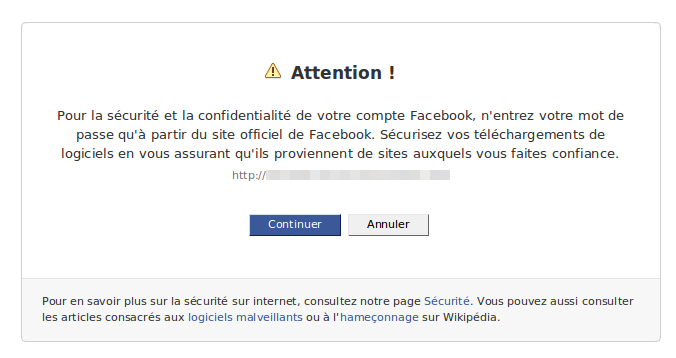
Du coup, avec un lien de ce type, je peux vous envoyer sur korben.info directement :
http://apps.facebook.com/quelendroitltwgzmv/?next=http://www.korben.info
Et alors me direz vous ? Et bien il devient ainsi très simple de faire prendre des vessies pour des lanternes à ses amis Facebook...
Par exemple, je peux vous proposer une fausse page de login qui récupérera vos mots de passes FB (pas fonctionnel, je vous rassure, c'est juste pour la demo) :
http://apps.facebook.com/quelendroitltwgzmv/?next=http://pictures.korben.info/fake.html
Et avec un petit coup de tinyurl :
http://apps.facebook.com/quelendroitltwgzmv/?next=http://tinyurl.com/ygrj2tq
Impossible de savoir à l'avance ce qui vous attends...
Bon, Facebook, tu la corriges cette faille ou pas ? Ou alors tu vas être obligé de changer ton url en Fakebook.com 






Le Figaro (s'abonner) : Chavez veut éradiquer le golf au Venezuela ...
Le Blog Luxe (s'abonner) : Hugo Chavez veut tuer le golf ...
participants : Le Figaro, CSP, Le Blog Luxe, ...
(4 posts, dernière mise à jour 20/10/2009 17:36)


La société ViconRevue s'apprète à commercialiser l'appareil photo développé pour l'expérience SenseCam de Microsoft Research et qui a permis à Gordon Bell d'enregistrer sa vie depuis plusieurs années. Pour 550 euros, la caméra que l'on porte autour du cou sera capable de prendre une photo toutes les 30 secondes et de stocker quelques 250 heures d'images. Le lifelogging et la mémoire artificielle arrivent à portée de tous ?

Which browser is the most secure web browser? That’s a question that is hard to answer and Internet users usually mention the web browser that they are using when asked the question. There are some differences in the architecture. Google Chrome and Internet Explorer for example make use of sandboxes that prevent that the whole web browser is attacked if malicious code is executed in a tab in the browser.
Additional differences become apparent in the web browser plugin development and availability. Some browsers offer thousands of plugins while others only a handful. Plugins can be a very effective way of adding additional protection to the web browser. This article is about the top 5 security plugins for the most popular web browsers. If you know of a plugin that is missing in the list let us (and everyone else) know about it in the comments.
No Script – The one add-on that many security experts do not want to live without. No Script can block script execution on websites. It does so on all websites by default with the option to enable specific scripts temporarily or permanently. The add-on can prevent script based attacks (most of them are) if used correctly.
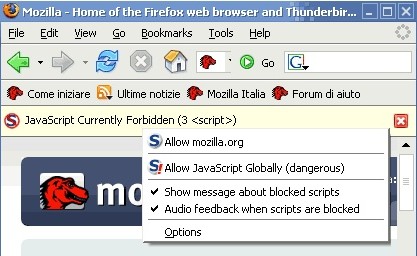
Last Pass – The password manager for Firefox. It can generate and remember secure passwords, fill out forms and even auto login the user into websites. The three important security related features are secure password generation, password storing and auto login. Secure passwords have the weakness that they are hard to remember. It is simply easier to remember 123456 than f&z_cU!;re4xZ especially if you consider that unique passwords should be used one every website. With Last Pass users get unlimited secure passwords with the need to only remember the master password. The auto login feature can be very effective against phishing attacks as it won’t work on phishing websites that use a different url than the original.
No Redirect – A versatile add-on that handles several things at once. It will reveal the destination url of short url services and prevent that Internet providers and other companies use DNS hijacks to show their (search pages). This does happen for instance with many major ISPs if the user mistypes a domain extension.
Link Extend and Web of Trust – Link Extend and Web of Trust provide a similar functionality. They provide website ratings to inform the user about potentially dangerous websites. Both display ratings in major search engines but also in a toolbar for the active page.
CS Lite – Cookie permissions on a per-site basis. Allows the user to block or allow cookies permanently or temporarily.
Backup: Febe Firefox Backup. It is always a good idea to create regular backups to be prepared when data gets corrupted or deleted. Febe is a Firefox add-on that can backup all profile data of the web browser including bookmarks, settings, extensions and passwords.
Google Chrome
Last Pass – The Last Pass password manager is also available for the Google Chrome web browser. Extension support is currently only available for dev releases of the Google browser. The functionality on the other hand is similar to that of the Firefox add-on. It is possible to generate passwords, store them and use the auto login feature.
Flash Block – This is the closest to the No Script Firefox add-on. Flash Block will only block Flash content but not other script related objects.
McAfee Site Advisor bookmarklet – There are not many Google Chrome extensions yet. Bookmarklets try to close that gap by allowing all Google Chrome users – and not only those that use a dev version – to make use of additional features. This bookmarklet will display McAfee Site Advisor ratings when executed. Comparable to Wot or Link Extend with the difference that it has to be executed manually.
Adsweep and Adblock+ – Two options to disable most advertisement that is displayed on websites. These add-ons are more about the annoying objects on websites and less about security. They can however be helpful in situations were rogue ads are displayed that spread malware.
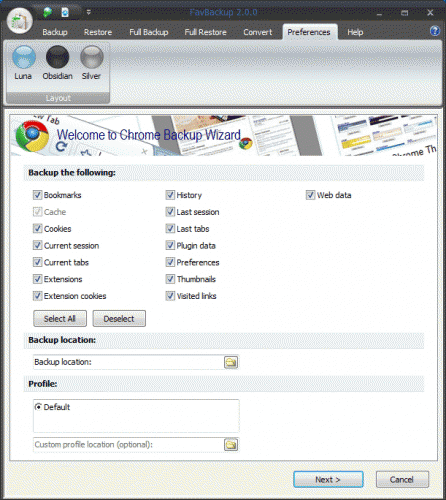
Backup: Fav Browser – Fav Browser 2 can backup and restore all settings of Google Chrome 2, 3 or 4.
Internet Explorer
Last Pass – Did we mention that we love Last Pass? The password manager is available as a plugin for Microsoft’s Internet Explorer. It offers the same functionality on all supported web browsers including password generation and secure storage of passwords.
Web of Trust or Trend Protect – Both display ratings for the active websites and websites that are listed in the major search engines (Google Search, Yahoo Search, MSN). They can be used as an indicator if a site’s potentially dangerous to visit.
IE7 Pro – A great plugin for Internet Explorer (not only 7 but also Internet Explorer 8) that offers ad blocking and many additional features. It comes closes to the No Script Firefox add-on. The ad blocker includes a Flash Blocker. Another interesting module is userscript support which can be also beneficial to security.
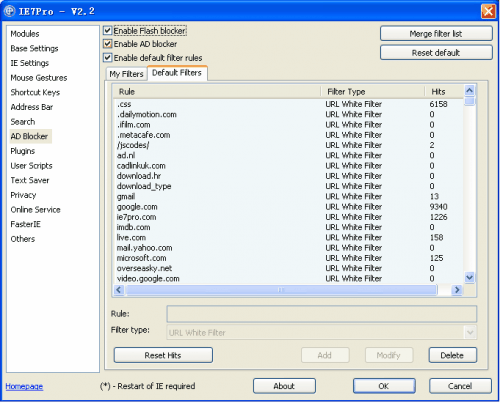
Backup: Fav Backup – You can use the tool to backup and restore Internet Explorer profile settings.
Only four for Internet Explorer. Do you know of additional Internet Explorer security add-ons? Let us know in the comments.
Tags: firefox, firefox security, google chrome, google chrome security, internet explorer security, internet-explorer, security pluginsRelated posts
- Xenocode Web Browser Sandbox (0)
- Web Browser Popularity (51)
- Web Browser Memory Usage Benchmark Gets It All Wrong (15)
- Web Browser Have Impact On Battery Life (1)
- Web Browser Benchmark Comparison (19)