 Liste de partage de Grorico
Le Parti Pirate, qui a fait son entrée au Parlement Européen avec 7,1 % de voix en Suède, a choisi de s'allier au groupe des Verts pour peser sur les débats pendant la législature.
[Lire la suite]Alors que la question de la gouvernance d'Internet est un débat majeur pour l'avenir du Réseau des réseaux, l'ICANN a désormais un nouveau patron et il est Américain. Cette nomination révèle à nouveau l'intention des USA de garder le contrôle sur Internet, pour des raisons à la fois politiques et économiques.
[Lire la suite]The next installment of the Firefox web browser comes with a new location-aware browsing (geolocation) feature that is enabled by default. Geolocation makes it possible to identify the user’s location in the world based on data such as the computer’s IP address. It has to be noted that messages will be displayed whenever the user opens a website that makes use of the new location-aware browsing feature. The message looks similar to those when installing add-ons from third party websites and basically gives the user the choice to allow or disallow the gelocation service on that specific website.
A click on the Share Location button will share the current location with the website while a click on Don’t Share will prevent it.
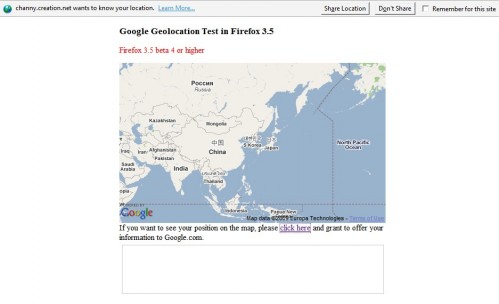
To be precise, the following information will be send to the website:
Your computer’s IP address,
Information about the nearby wireless access points, and
A random client identifier, which is assigned by Google, that expires every 2 weeks.
Firefox users who never intend to use the geolocation feature might want to disable it permanently. This can be done easily by typing [about:config] in the Firefox address bar to open the Firefox configuration. The feature can now be disabled by entering [geo.enabled] into the Filter form at the top and pressing the enter key. The geo.enabled parameter should now be displayed. The easiest way to disable geolocation is to double-click the entry so that the Value displays false afterwards.
You find more information about geolocation on the Location-Aware browsing page over at Mozilla which also explains how to get remove permissions that have already been granted to websites and the random client identification number.
Tags: firefox geolocation, firefox tips, geolocation, location-aware browsing, mozilla-firefox, web browserRelated posts
- Quick Jump To Text Fields In Firefox (9)
- Moving The Firefox Disk Cache To Another Drive (4)
- Make Firefox Search For Terms With Periods In The Location Bar (15)
- How To Zoom In Firefox (13)
- Firefox URLBar Extension (1)






Dans le fond de l'Atlantique, dans la région des Baha...
