 Liste de partage de Grorico

Quand on voit des vidéos comme ça, et bien ça fait juste plaisir ! Et je tenais à le partager avec vous en ce dimanche de fête de la musique ! 
Et sinon, vous pouvez aussi offrir des vinyles recyclés de la boutique
On parle beaucoup d’Android pour les netbooks mais peu de gens l’ont finalement testé.
C’est maintenant possible grâce à ce Live CD.
Il s’agit d’une version brute d’Android donc non adaptée aux netbooks. Cela permet de se faire une idée des adaptatiosn nécessaires et des points forts de la plate-forme.
Le Live CD est optimisé pour l’Asus EEE 701 donc ne vous étonnez pas de ne pas trouver les pilotes de votre matériel dernier cri.

 It is essential to have a solid backup strategy in place with cloud storage space becoming more popular. While many users run backup software on their local computer system to backup important data only a few take care that uploaded data is also regularly backed up.
The reason for this is that many users believe that the data is safe on Internet servers. A lot can happen that can put the data on those servers at risk. This ranges from hacking attempts, hardware failures that cause data loss or bankruptcy. It is therefor essential to make sure that data that is stored online is backed up regularly.
We have already mentioned how to backup Gmail before should be essential for every Gmail user. While it is unlikely that Gmail will be discontinued there have been times where the service was not accessible. Having a backup of the data would make it possible to access the emails anyway.
Google Docs Backup is another Windows backup software that can be used to backup one of the popular Google services. Users can use it to backup all documents on their local computer system that they have uploaded to Google Docs. Usage of the backup software has been simplified. All that needs to be done is to enter the username and password of the Google Docs account and to select a directory on the local computer where the data should be downloaded to.
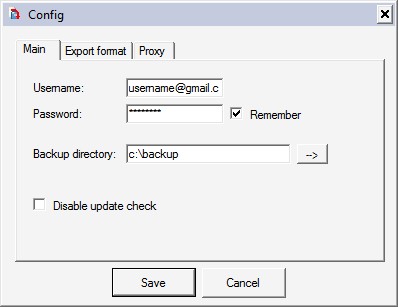
A few optional settings are available. It is for example possible to select the output format for each document type and to route the traffic through a proxy server. A click on the Exec button will initiate the data backup which can take some time depending on the size of the data stored at Google Docs and the connection speed.
Gdoc Backup (via To The PC) is a free software program for the Windows operating system.
Tags: backup, backup software, documents, Google, google docs, google docs backup, software, windows backup, windows softwareRelated posts
- The 10 Best Windows Backup Software Programs (48)
- Windows Backup Software DeltaCopy (10)
- Windows Backup Software: Backup Maker (10)
- Transfer And Backup Files With File Transfer Software Fling (4)
- O&O DiskImage 3 Express Edition (0)






I use Google out of habit and because I have always thought it is the best search engine. I’ve never objectively tried to compare major search engines and as a result I haven’t changed.
Blind Search allows you to compare the results of Google, Bing and Yahoo. You search for a term in it, and it brings up all 3 results side-by-side, but you are not told which site is which. You then say which you think is better, and the names are then revealed!
After using the site a dozen or so times, a clear image of what is the best search engine for you forms.
I was surprised that Google was only best for me in about a third of searches; I found Bing’s results much more relevant. (The creator of the site works for Microsoft though; although it isn’t affiliated to them!)
They also offer an OpenSearch plug-in (so it can be added to Firefox’s search bar, for example) and a plugin IE8. It also works for image search. Unfortunately, the site currently only works in US localisations, so one can’t use it to search google.co.uk etc.
Tags: bing, Google, live.com, microsoft, Search Engines, yahooRelated posts
- Search Bing And Google Simultaneously (12)
- Reevaluating Google is the best theory (12)
- Yahoo, sick of them yet? (4)
- Yahoo vs. Google vs. Msn, Search commands compared (3)
- Worio Combines Bookmarking And Web Search (1)






Sa mère l’interdit de jouer à World of Warcraft ? La pilule passe mal (la télécommande aussi). Fake probable.


Voici une petite vidéo en Stop Motion réalisée avec des post-it ! Impressionnant…
Partager :Tags:Post-It, Stop Motion, Video
Sur le même sujet :
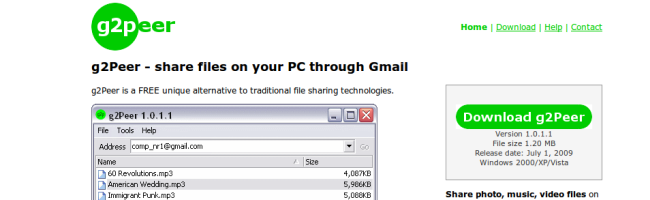
g2Peer est un petit logiciel gratuit pour Windows qui permet de partager des fichiers avec d’autres personnes en utilisant son adresse et son espace de stockage Gmail. Pas besoin de grand chose… De votre côté, vous partagez un de vos répertoires et vous ajoutez la liste des personnes autorisées à le consulter…
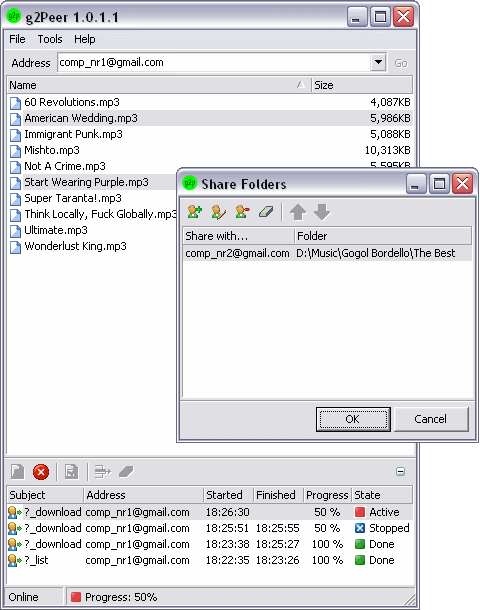
Et de l’autre côté, pour télécharger les fichiers, vous pouvez, soit utilise g2Peer, soit carrément passer par l’interface de Gmail et interroger à distance le compte Gmail de votre ami à coup de commandes spéciales dans le sujet du mail
Petite explication…
Vous devez donc disposer de 2 adresses Gmail et de g2Peer installés sur les 2 ordis… On va dire que l’ordinateur n°1 a une adresse comp_nr1@gmail.com et que l’ordinateur n°2 a l’adresse comp_nr2@gmail.com
Voici la config a faire pour commencer à partager des fichiers entre l’ordinateur n°1 (Computer Nr.1) et l’ordinateur n°2 (Computer Nr.2) :
Etape 1 : Configurer les 2 clients avec les informations pop3 ou imap des comptes Gmail
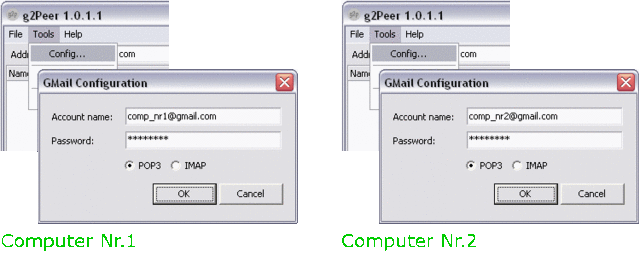
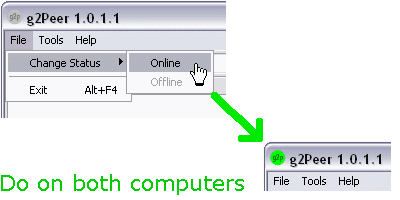
Etape 2 : Démarrer g2Peer sur les 2 ordinateurs
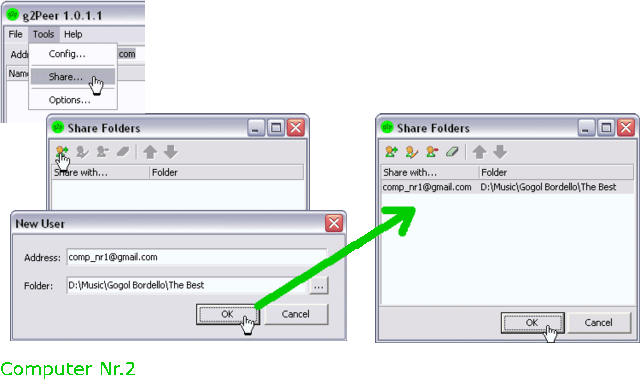
Etape 3 : Ajouter l’adresse email de l’ordinateur n°1 aux autorisations de partage de l’ordinateur n°2 afin de permettre à l’ordinateur n°1 de lister les fichiers dispo sur le n°2. Faites l’inverse pour si vous voulez aussi que l’ordinateur n°2 puisse voir ce qu’il y a sur le n°1.
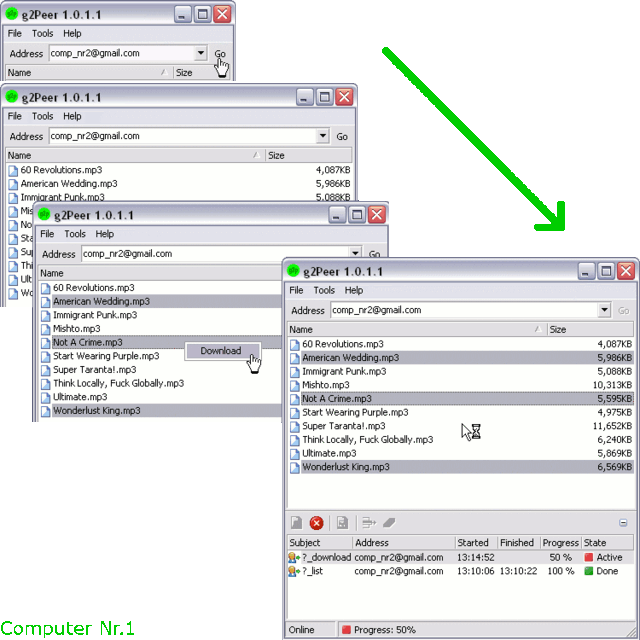
Etape 4 : Et voilà, c’est configuré !! Maintenant, si vous voulez obtenir la liste des fichiers de l’ordinateur n°2 à partir de votre ordinateur n°1, entrez simplement l’adresse Gmail de l’ordinateur n°2 dans g2Peer et patientez jusqu’à recevoir la liste des fichiers partagés. Téléchargez ensuite comme bon vous semble.
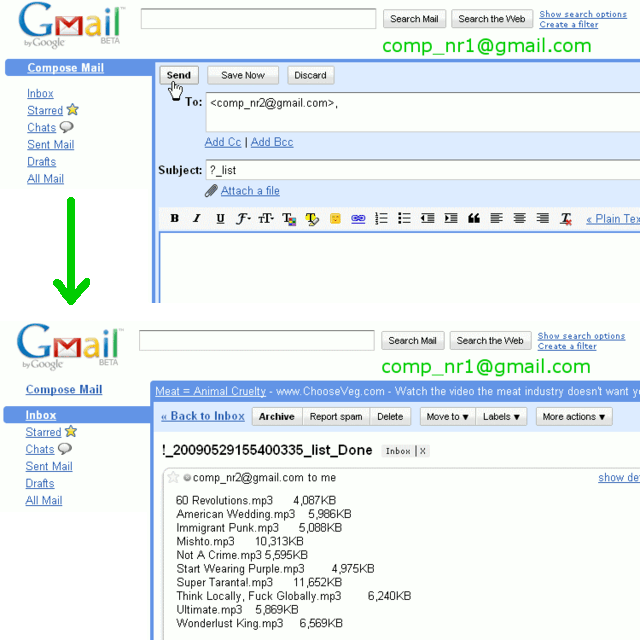
La commande ?_download se met aussi dans le sujet du message que vous envoyez à l’ordinateur n°2 mais vous devez préciser le nom des fichiers à récupérer dans le corps du mail.
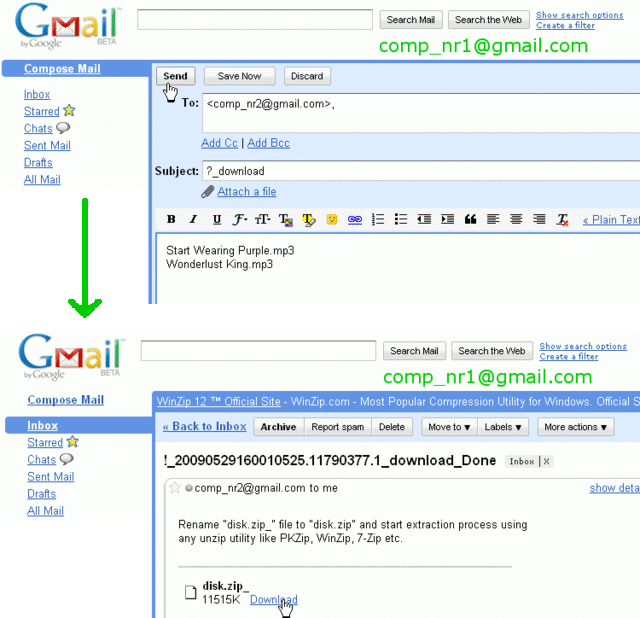
La réponse que vous obtiendrez sera un fichier zippé avec le contenu tant attendu !
Pour télécharger g2Peer c’est ici !!
Amusez vous bien !